Rotas
How to run a church rota
Plan roles, collect replies and keep your Sunday team informed.
Last updated: 2026-09-22
Try Levites free · Get the app
What is a church rota?
A church rota (also called a roster or serving schedule) is the plan that says who serves where, and when: who is on the welcome door, the sound desk, the projection computer, kids ministry or refreshments for each service. Every church has one — the only question is whether it lives in a battered spreadsheet, a WhatsApp thread, or a system your volunteers can actually rely on.
Why church rotas fall apart
If your rota keeps breaking, it is almost never because people don’t care. It is usually one of these five failures:
- The rota lives somewhere people don’t look. A PDF emailed once a month is invisible by week two. A pinned WhatsApp message scrolls away within a day.
- No personal view. Volunteers have to scan a whole grid to find their own name. When it takes effort to know your dates, people stop checking.
- No reminders. Most no-shows aren’t refusals — they’re forgetfulness. A midweek nudge fixes the majority of gaps.
- Swaps go through one person. If every change needs the coordinator, the coordinator becomes the bottleneck — and the single point of failure.
- It’s published too late. A rota released on Thursday for Sunday guarantees conflicts. People need weeks, not days.
A rota is a communication problem wearing a scheduling costume. Fix where the rota lives and who it speaks to, and most “volunteer reliability” problems disappear.
The rhythm that makes any rota work
- Plan 4–6 weeks ahead. Long enough for diaries, short enough that people remember what they agreed to.
- Publish at least two weeks before the month starts.
- Cap serving frequency. Once or twice a month per person prevents burnout and spreads ownership.
- Remind midweek. Wednesday or Thursday for the coming Sunday, naming the role and arrival time.
- Keep a backup list. Two or three “on-call” people per team who are happy with short notice.
What a church rota app should do
When you evaluate a church rota app, ignore the feature checklists and ask four questions:
| Question | Why it matters |
|---|---|
| Does each volunteer get a personal “my dates” view? | Nobody should scan a grid to find their name. |
| Are reminders automatic? | The coordinator shouldn’t be a human alarm clock. |
| Does it assign named roles, not just names? | “Sunday: Sarah” is ambiguous. “Sunday, Camera: Sarah” is a rota. |
| Is communication built in? | If the rota lives apart from team chat, changes get missed. The rota should live where your team already talks. |
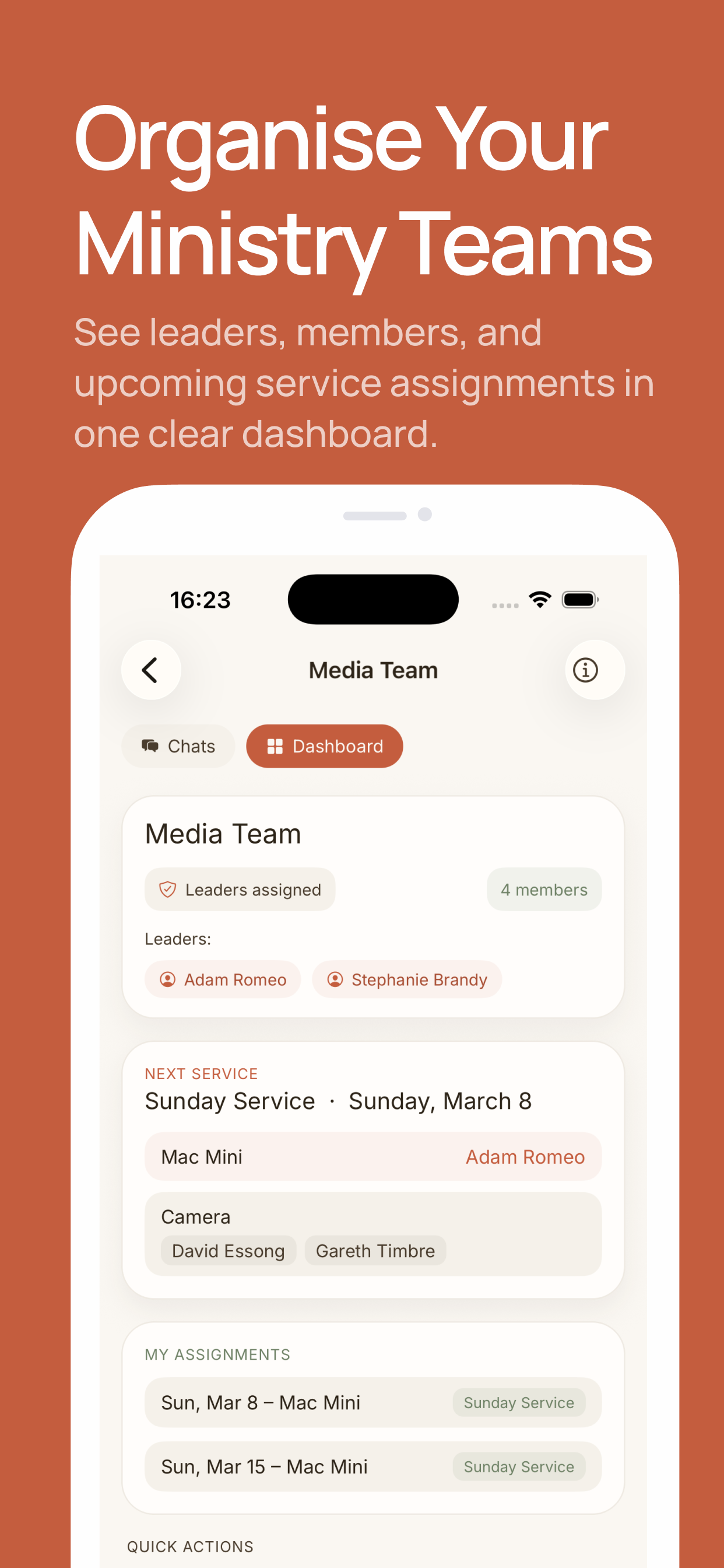
How to run your rota in Levites
- Create your church workspace and add a ministry for each team — worship, media, welcome, kids.
- Invite your team. Members join by invite, so you never circulate phone numbers.
- Create the service (e.g. “Sunday Service — March 8”) from the Rota tab.
- Assign named roles — Camera, sound desk, projection — to specific people.
- Done. Everyone sees their upcoming dates under My Assignments, and reminders go out automatically. Changes are announced in the same app your team chats in.
A worked example: your first four-Sunday rota
This is an illustrative plan, not a customer case study. Imagine a media team covering sound and projection at one Sunday service. Alex and Casey cover sound; Jordan and Taylor cover projection. After checking availability, Alex and Jordan take the first and third Sundays, while Casey and Taylor take the second and fourth. Each person gets two proposed assignments.
- Create the team and invite the four volunteers.
- Add the service dates and the sound and projection roles.
- Assign each date according to the availability you collected.
- Ask each person to accept or decline in Levites. A name on the rota is not a confirmed reply.
- If Casey declines the second Sunday, ask a suitably trained volunteer about cover, update the assignment and confirm the new plan.
Check the actual dates each month, including any fifth Sunday. Keep a suitable backup agreed with the team, and check for assignments in other ministries before asking someone to cover.
Build your first team rota in Levites →
Need to collect dates first? Use the availability form, then follow these reminder examples.
Frequently asked questions
What is a church rota?
A schedule assigning volunteers to roles for each service or event — who is on welcome, sound, projection, kids or refreshments on a given Sunday.
How far in advance should a church rota be published?
Plan 4–6 weeks out and publish at least two weeks before the month starts, so conflicts surface while there’s still time to swap.
What should a church rota app include?
Named role assignments per service, a personal view for each volunteer, automatic reminders, and built-in team communication.
Watch: Plan the Sunday rota · 25 sec
Assign worship roles, let volunteers accept or decline, and see who has confirmed. Animation with music; no speech.
Try your next Sunday rota in Levites.
Keep assignments, replies and team messages together.
Try Levites free. No card required.